今日打算幫一部 Windows XP 換 hard disk,由原本的 160GB 升級到 500GB。當然,例牌係用 Gparted Live CD 來完成呢個工作啦。
當 Gparted 執行才十餘分鐘,就停了。它指出有 Bad Sector 而拒絕繼續。按指示,進入 Windows 後執行 chkdsk /f /r C:,重啟後經過漫長的 scanning 便發見了一個 4KB 的 bad sector。檢測完畢後又再重啟兩次,才接上新 harddisk 再進入 Gparted。
但 Gparted 依然拒絕工作。幸好網上找到一位仁兄,教如何逼使 Gparted 乖乖就範......
http://www.unfinishedteleporter.com/?p=3238
Showing posts with label Linux. Show all posts
Showing posts with label Linux. Show all posts
Sunday, 4 September 2011

Saturday, 9 January 2010
First Experience with Maemo
Nokia N900 已經在外國推出了,但似乎沒有強勁的宣傳,反倒有朋友向我查問 Nexus One(HTC Android)。不過暫時沒有可能接觸到 Android,反而 Maemo 的機會更高,所以我在屋企的 iMac 安裝了 Maemo SDK,看看它到底是個怎樣巴閉的系統。
安裝 Ubuntu(VM 方法)
1. 安裝 Sun Micro 的 VirtualBox VM (3.1.2 r56127)。
2. 安裝 Ubuntu (9.10),最好預留 1GB RAM。
3. 安裝 Guest Additions。若剛升級舊版的 VirtualBox,最好關掉再開,因為舊版的 Guest Additions 不支持 Linux。Guest Additions 版本正確,便會看到這個 dialog:

在 Terminal 裡以 root 執行(sudo即是 superuser do)
$ sudo ./VBoxlinuxAddition-x86.run
4. 重新啟動。
順帶一提,我是 Ubuntu/Linux 初哥。以前大學用 Unix 的技巧都忘了,平日也甚少使用 Linux/Ubuntu。
安裝 Maemo SDK
5. 下載 Maemo 5 SDK,官網這裡,直接下載這裡。最簡單的方法,是只下載 GUI Installer。
6. Right click "maemo-sdk-install-wizard_5.0.py",選擇 Permissions,勾選 Allow executing file as program,按 Close。
7. 在 Terminal 裡以 root 執行
$ sudo ./Downloads/maemo-sdk-install-wizard_5.0.py
8. 按指示完成安裝。
9. Double click 桌面上的 Maemo5 SDK。
可以好好玩一下這個(很慢)的 Maemo 系統

Programming on Maemo
玩完這個 emulator 可以正式試試 programming。可以按這個官網做些測試(這裡)。
$ lsmod | grep binfmt
$ dpkg -l | grep xephyr
這兩個測試成功後,login scratchbox
$ /scratchbox/login
helloworld.c 的測試應該問題不大。唯獨是 GUI Hello World gtk_helloworld-1.c 就麻煩點。我執行 $ pkg-config --list-all | sort 卻沒有找到 gtk+-2.0
$ dpkg-query -S gtk+-2.0
dpkg: *gtk+-2.0* not found.
$ dpkg-query -S libgtk2.0-dev
dpkg: *libgtk2.0-dev* not found.
即是說,Ubuntu 9.10 本身並沒有安裝 GTK+,需要人手安裝:
[sbox-FREMANTLE_X86: ~] > sudo apt-get install libgtk2.0-dev
再次執行 pkg-config --list-all | sort 便找到 gtk+-2.0 了。
再 compile,但今次指令有所不同:
[sbox-FREMANTLE_X86: ~] > gcc -Wall -g gtk_helloworld-1.c `pkg-config --cflags gtk+-2.0` -o gtk_helloworld-1
注意,那個不是 single quote,又不是 double quote,是 backticks,是 "1" 鍵旁那個鍵。
按指示完成所有 compile 後,在執行 ./gtk_helloworld-1 之前,請先打開 Maemo SDK(從桌面雙擊 Maemo5 SDK,我試過 Xephyr :2 -host-cursor -screen 800x480x16 -dpi 96 -ac -kb & 但不work)。玩完這個很齋的 Hello World 之後,按 Ctrl+C 關閉。
就這樣,Documentation/Maemo 5 Developer Guide/Development Environment/Maemo SDK 便完成了。
安裝 Ubuntu(VM 方法)
1. 安裝 Sun Micro 的 VirtualBox VM (3.1.2 r56127)。
2. 安裝 Ubuntu (9.10),最好預留 1GB RAM。
3. 安裝 Guest Additions。若剛升級舊版的 VirtualBox,最好關掉再開,因為舊版的 Guest Additions 不支持 Linux。Guest Additions 版本正確,便會看到這個 dialog:

$ sudo ./VBoxlinuxAddition-x86.run
4. 重新啟動。
順帶一提,我是 Ubuntu/Linux 初哥。以前大學用 Unix 的技巧都忘了,平日也甚少使用 Linux/Ubuntu。
安裝 Maemo SDK
5. 下載 Maemo 5 SDK,官網這裡,直接下載這裡。最簡單的方法,是只下載 GUI Installer。
6. Right click "maemo-sdk-install-wizard_5.0.py",選擇 Permissions,勾選 Allow executing file as program,按 Close。
7. 在 Terminal 裡以 root 執行
$ sudo ./Downloads/maemo-sdk-install-wizard_5.0.py
8. 按指示完成安裝。
9. Double click 桌面上的 Maemo5 SDK。
可以好好玩一下這個(很慢)的 Maemo 系統

Programming on Maemo
玩完這個 emulator 可以正式試試 programming。可以按這個官網做些測試(這裡)。
$ lsmod | grep binfmt
$ dpkg -l | grep xephyr
這兩個測試成功後,login scratchbox
$ /scratchbox/login
helloworld.c 的測試應該問題不大。唯獨是 GUI Hello World gtk_helloworld-1.c 就麻煩點。我執行 $ pkg-config --list-all | sort 卻沒有找到 gtk+-2.0
$ dpkg-query -S gtk+-2.0
dpkg: *gtk+-2.0* not found.
$ dpkg-query -S libgtk2.0-dev
dpkg: *libgtk2.0-dev* not found.
即是說,Ubuntu 9.10 本身並沒有安裝 GTK+,需要人手安裝:
[sbox-FREMANTLE_X86: ~] > sudo apt-get install libgtk2.0-dev
再次執行 pkg-config --list-all | sort 便找到 gtk+-2.0 了。
再 compile,但今次指令有所不同:
[sbox-FREMANTLE_X86: ~] > gcc -Wall -g gtk_helloworld-1.c `pkg-config --cflags gtk+-2.0` -o gtk_helloworld-1
注意,那個不是 single quote,又不是 double quote,是 backticks,是 "1" 鍵旁那個鍵。
按指示完成所有 compile 後,在執行 ./gtk_helloworld-1 之前,請先打開 Maemo SDK(從桌面雙擊 Maemo5 SDK,我試過 Xephyr :2 -host-cursor -screen 800x480x16 -dpi 96 -ac -kb & 但不work)。玩完這個很齋的 Hello World 之後,按 Ctrl+C 關閉。
就這樣,Documentation/Maemo 5 Developer Guide/Development Environment/Maemo SDK 便完成了。
Friday, 7 December 2007
死吧,WGA!
"Microsoft kills Windows Genuine Advantage" - MacWorld UK (src: http://www.macworld.co.uk/blogs/index.cfm?email&entryid=300&blogid=2)
"And I think it’s no coincidence that none of them are made by Apple." - Mark Hattersley
看後,令人拍案叫絕!大快人心!
Mac OS萬歲!Linux萬歲!Karena萬歲!收工。
"And I think it’s no coincidence that none of them are made by Apple." - Mark Hattersley
看後,令人拍案叫絕!大快人心!
Mac OS萬歲!Linux萬歲!Karena萬歲!收工。
Monday, 19 March 2007
Naming My Devices (2)
As previously posted, I use animal species as name of my hardware. My Nokia N70 is called Phoenix, after replacing mainboard. My virutal XP on Mac is called Kestrel (a type of small falcon). And for virtual Ubuntu, it will be called Shoveler. I might change the name of iMac to Egret (and reserved the name "Heron" for my Mac Book Pro... if I have one).
So, there are falcon, dolphin, penguin, hawk, egret, phoenix, kestrel and shoveler all on my desk.
So, there are falcon, dolphin, penguin, hawk, egret, phoenix, kestrel and shoveler all on my desk.
Friday, 16 March 2007
Ubuntu 6.10
 After XP, the next OS I would like to install on a PC is Linux. Oh, not NextOS. It's Ubuntu 6.10. And one of the first thing I wish to do inside Ubuntu is... listening to MP3. But listening to mp3 (source from a networked XP) on Ubuntu in Parallels for Mac OS is kinda... waste. But who cares! Nowadays, besides dummies and electricity, one of excessive thing we have is computing power. So, hail to the Mac!
When would the price of 2GB DDR-2 667Mhz RAM drops? Once it reach $1500, I would purchase one.
Friday, 10 November 2006
Naming My Devices
In computer world, every device can have a name for identification. Naming them one by one has been a headache to me. Most of the time I just use their model number. Sometime will added my name with it. But sometime I would give them a better name.
falcon - the second desktop built by me. This name was first used in a file server from the first company I worked for. Furthermore, I was using falconer somewhere for something before, which I had now forgot. A funny thing about this computer is that, I picked the slowest P4 CPU available in the market, rather than a fastest one.
dolphin - Buffalo LinkStation is a 250GB LAN disk I bought for backup purpose. I tried to pick names of animal species, to match with falcon. "D" for data and "D" for dolphin.
swallow - I borrowed Sunny's CPU-onboard computer for some time (now returned). This computer won't start up if installed memory is over 64 MB RAM.
Penguin - for my white and black Nokia E50.
Hawk - during reinstalling the Bluetooth software on my second laptop, IBM ThinkPad T42, I gave it a new name. This comes from black hawk (in Chinese) as T42 has black body.
I want to rename my white iMac and black Nokia N70 if possible, but don't have any good names to represent them. iMac is white...... may be... polarbear? And Owl for the black N70?
falcon - the second desktop built by me. This name was first used in a file server from the first company I worked for. Furthermore, I was using falconer somewhere for something before, which I had now forgot. A funny thing about this computer is that, I picked the slowest P4 CPU available in the market, rather than a fastest one.
dolphin - Buffalo LinkStation is a 250GB LAN disk I bought for backup purpose. I tried to pick names of animal species, to match with falcon. "D" for data and "D" for dolphin.
swallow - I borrowed Sunny's CPU-onboard computer for some time (now returned). This computer won't start up if installed memory is over 64 MB RAM.
Penguin - for my white and black Nokia E50.
Hawk - during reinstalling the Bluetooth software on my second laptop, IBM ThinkPad T42, I gave it a new name. This comes from black hawk (in Chinese) as T42 has black body.
I want to rename my white iMac and black Nokia N70 if possible, but don't have any good names to represent them. iMac is white...... may be... polarbear? And Owl for the black N70?
Friday, 3 February 2006
Red Hat Linux 8.0 Part III
尋日放工回家就繼續裝Linux,食完飯差唔多裝完,太好了,終於boot入GNOME。之後猛睇documents,煲左三個chapters又搞左好耐終於上到網。部機屬於輕巧型(當年),所以連network卡都係要另外用PCMCIA加上去。
好,今日繼續睇Linux既GSG... Getting Started Guide
好,今日繼續睇Linux既GSG... Getting Started Guide
Tuesday, 31 January 2006
Red Hat Linux 8.0 Part II
尋日關機時發現一句很怪的comment:
Open Linux
我想,Red Hat Linux無法成功啟動GUI或許和這個有關,所以今日晚飯後就即刻再裝多一次,今次所有partition都format一次,partition分佈很奇特:1GB, 300MB SWAP, 15MB free, 4GB,中間15MB是bad sector,萬萬不能用,format都無效,因為一format到那個位置,部機就會死下死下,之後reboot。
今次選擇將個linux裝響頭果1GB,所以只裝最基本既野。但係咁都要40分鐘先裝完,唉,部機真係慢。
今次終於成功BOOT得起個GUI,用既係GNOME。以前未用過,要學下先。希望可以上手啦。
Open Linux
我想,Red Hat Linux無法成功啟動GUI或許和這個有關,所以今日晚飯後就即刻再裝多一次,今次所有partition都format一次,partition分佈很奇特:1GB, 300MB SWAP, 15MB free, 4GB,中間15MB是bad sector,萬萬不能用,format都無效,因為一format到那個位置,部機就會死下死下,之後reboot。
今次選擇將個linux裝響頭果1GB,所以只裝最基本既野。但係咁都要40分鐘先裝完,唉,部機真係慢。
今次終於成功BOOT得起個GUI,用既係GNOME。以前未用過,要學下先。希望可以上手啦。
Thursday, 19 January 2006
Red Hat Linux 8.0 Part I
同事送了一套Ubuntu 5.10 Linux,單靠CD就能boot up,無需安裝,任何電腦都可以run Linux而無需鏟機。
「不如試下在舊notebook上run。」
已經裝在舊notebook上的Open Linux因版權問題停止支援(我是付錢買的),亦不支援notebook的sound card,有畫面無聲,現在有新的Linux,不妨一試。可是,搞了半天都無法執行,是機件故障麼?還是hardware型號太舊呢?或者因為它是十年前的產品……
後來又試下老友送的Red Hat Linux 8,單單安裝就用了三個鐘。安裝完可以順利boot up,但無論選擇登入GNOME或KDE都只有這個畫面,點解?還我三個鐘呀~

p.s.: my old laptop is Texus Instrument Extensa 900. It was sold to Acer on late 90s.
「不如試下在舊notebook上run。」
已經裝在舊notebook上的Open Linux因版權問題停止支援(我是付錢買的),亦不支援notebook的sound card,有畫面無聲,現在有新的Linux,不妨一試。可是,搞了半天都無法執行,是機件故障麼?還是hardware型號太舊呢?或者因為它是十年前的產品……
後來又試下老友送的Red Hat Linux 8,單單安裝就用了三個鐘。安裝完可以順利boot up,但無論選擇登入GNOME或KDE都只有這個畫面,點解?還我三個鐘呀~
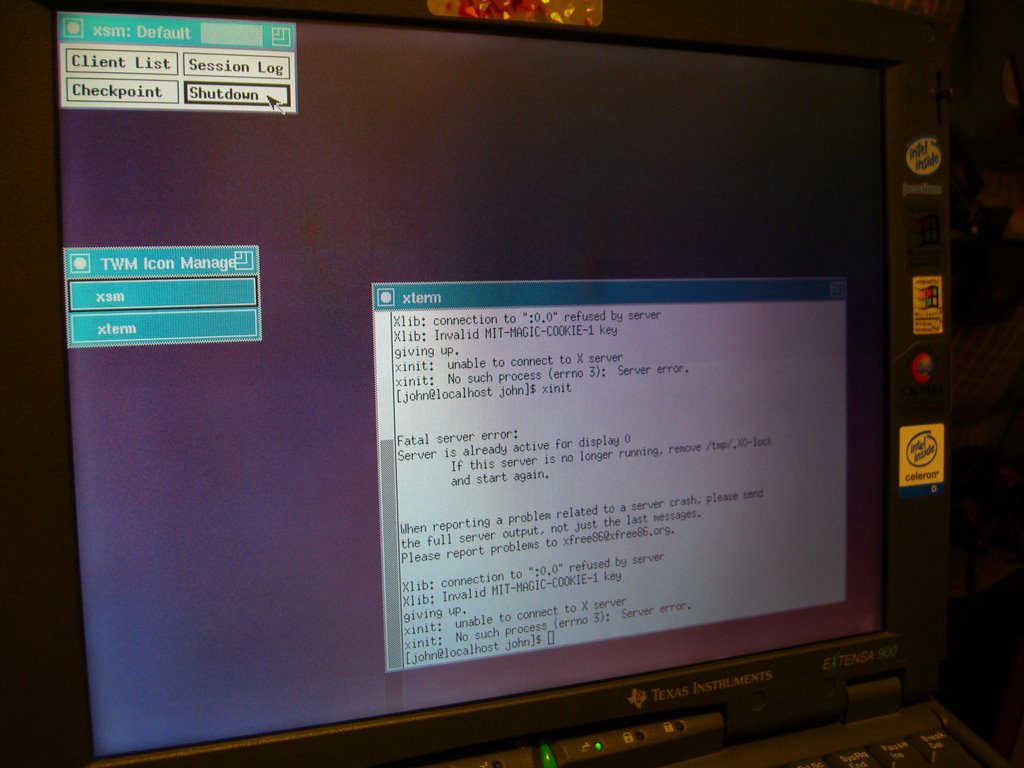
p.s.: my old laptop is Texus Instrument Extensa 900. It was sold to Acer on late 90s.
Subscribe to:
Posts (Atom)